

Why Mind Mapping Works for Dyslexia
Dyslexia is not merely a difficulty with reading and spelling; it is a fundamental difference in how the brain processes language and information. Fortunately, people with dyslexia often excel as “big-picture,” holistic, and highly visual thinkers.
This is where digital mind-mapping software becomes a transformative piece of assistive technology. By turning abstract concepts into spatial layouts, mind mapping aligns beautifully with the natural cognitive strengths of dyslexics, transforming studying from a frustrating chore into an engaging, accessible process.
Could It Be Dyslexia? The Critical First Step
Many individuals spend years struggling with dense text, time management, and essay structure without ever understanding why these tasks feel so disproportionately difficult. If you, your child, or a student you support struggles with linear processing, frequent spelling hurdles, or organizing thoughts on paper, it might not be a lack of effort it could be undiagnosed dyslexia.
Recognizing these traits is the first step toward unlocking the right support. If you think you might be dyslexic, the most empowering action you can take is to undergo a formal dyslexia screening test.
A screening test provides a baseline understanding of your cognitive profile, highlighting both your areas of challenge and your hidden visual strengths. Specialized organizations, such as the Indigo Dyslexia Centre, offer professional, accessible screening.
Getting tested through a provider like the Indigo Dyslexia Centre not only brings clarity and peace of mind, but it also opens the doors to formal adjustments in school, university, and the workplace including access to free assistive software.
The Cognitive Science: Why Mind Mapping Works for Dyslexia
To understand why mind-mapping software is so effective as a tool for visual learning with dyslexia, it helps to examine how a dyslexic brain manages information. Dyslexia often impacts working memory (the mental workspace used to hold and manipulate information temporarily) and executive functioning (the cognitive skills required for planning, organizing, and sequencing tasks).
When a student with dyslexia is asked to write an essay or a report, they often face a severe cognitive bottleneck. They may understand the topic deeply and holistically, but the simultaneous demands of organizing ideas, structuring paragraphs, recalling spelling, and maintaining a linear narrative can utterly overwhelm their working memory.
Mind mapping bypasses this cognitive bottleneck through three primary mechanisms:
1. Simultaneous Processing
Instead of forcing ideas into a strict chronological line, a mind map allows a student to externalize all their thoughts onto a digital canvas simultaneously. They can dump ideas in any order and worry about the structure later.
2. Visual Hierarchy and Spatial Memory
Utilizing unique shapes, relational branches, and spatial positioning helps users remember where an idea sits in relation to the whole. This layout heavily reduces the strain on verbal memory by replacing it with spatial memory.
3. Dual Coding Theory
Combining text with visual elements like colours, symbols, or images gives the brain two separate pathways to encode and retrieve information. This drastically improves comprehension and long-term memory retention.
The Leading Mind-Mapping Software for Dyslexia
Several software packages have been developed or adapted specifically to serve as assistive technology. In educational sectors across the UK and globally, these programs are frequently approved for government grants, such as the Disabled Students’ Allowance (DSA) or Access to Work.
1. MatchWare MindView (AT Suite)
Widely considered the gold standard for higher education and professional environments, MindView is a highly structured, professional mind-mapping program.
- Why it’s the best: Its standout feature is its peerless, award-winning Microsoft Office integration. A student can build a highly visual mind map and, with a single click, export it into a perfectly formatted Microsoft Word document or PowerPoint presentation.
- How it helps: For a dyslexic student, turning a visual map into a linear essay is often the hardest part of a project. MindView automatically converts map branches into headings, subheadings, and bullet points in Word, removing the structural anxiety of essay writing. It also includes an integrated timeline and Gantt chart view for project planning.
2. Ayoa (by OpenGenius)
Created by the team behind traditional Tony Buzan mind mapping, Ayoa is a cloud-based, AI-powered visual workspace that blends organic mind mapping with modern task management.
- Why it’s the best: Ayoa offers an “Organic Mind Map” view that uses fluid, curved, and colourful branches mimicking natural thought patterns. It also heavily features built-in artificial intelligence tools to assist with brainstorming.
- How it helps: It reduces visual stress through highly customizable, distraction-free interfaces. The built-in AI helps students who experience “blank page syndrome” by generating branch ideas or expanding on concepts when a student feels stuck. It also bridges the gap between brainstorming and doing by turning map nodes directly into actionable task boards.
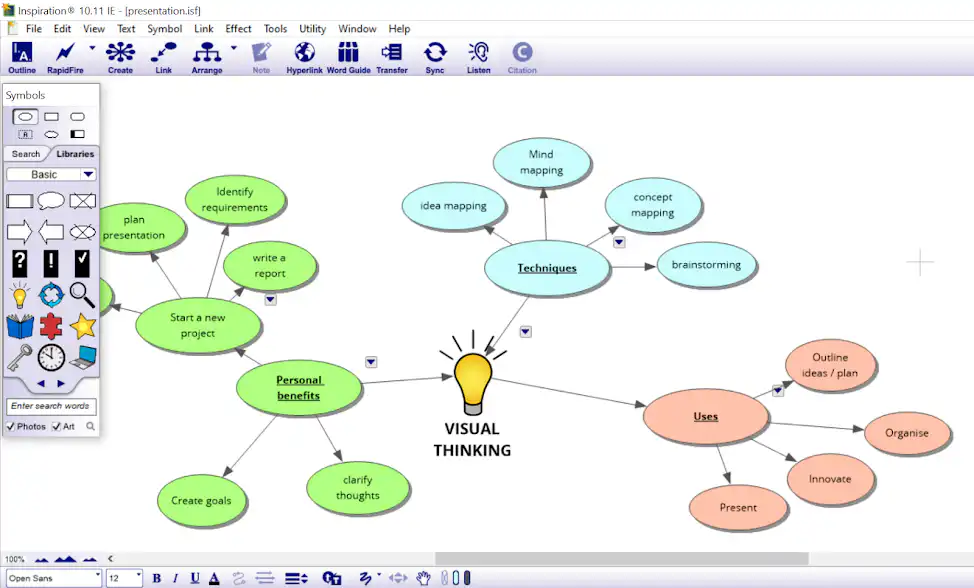
3. Inspiration
Inspiration has been a beloved staple in the assistive technology space for decades, particularly favoured in schools, colleges, and by specialized neurodiversity tutors.
- Why it’s the best: It is incredibly user-friendly, clean, and specifically designed with a low learning curve for students who may get overwhelmed by overly complex software interfaces.
- How it helps: It features a dedicated “Rapid Fire” tool that allows students to type out ideas continuously without worrying about where they fit, automatically generating bubbles that can be organized later. It also offers a seamless, one-click switch between the visual “Diagram View” and a linear “Outline View,” allowing students to see their essay structure evolve in real-time.
Applications Across Different Levels of Education
The way mind-mapping software is utilized evolves dynamically as a student progresses through their academic journey.
Primary and Secondary School
At the school level, the focus is on literacy development, comprehension, and vocabulary building. Students use programs like Inspiration to visually dissect stories or learn new subjects.
In Practice: Instead of writing a traditional book report, a dyslexic pupil might create a central bubble with the book’s title, branching out to character traits, settings, and plot points using images instead of text. This keeps the student engaged and allows them to demonstrate their comprehension without being penalized by their spelling or writing speed.
Further Education (Sixth Form & College)
In further education, students encounter modular exams, tight coursework deadlines, and a massive influx of technical facts. Here, mind mapping becomes an essential tool for exam revision and executive function.
In Practice: Students use software to map out entire module specifications. Color-coding branches by theme (e.g., green for biology modules on photosynthesis, blue for human anatomy) helps categorize information mentally. Creating these visual summaries makes active recall and spaced repetition revision much less taxing on text-weary eyes.
Higher Education (University)
At the university level, the cognitive load peaks. Students must manage independent research, complex dissertations, and lengthy literature reviews. This is where MindView and Ayoa truly shine.
In Practice: An undergraduate student can use a mind map to plan a 5,000-word dissertation. The central node is the thesis statement; main branches represent chapters; sub-branches hold arguments, and the student can attach PDF research papers, hyperlinks, and citations directly to those branches. When the map is complete, exporting it to Word yields a comprehensive, pre-structured skeleton of their paper, complete with intact attachments and references.
Pricing and Where to Purchase
Because these applications are specialized assistive technologies, they are available through specific licensing models and assistive tech vendors.
| Software | Approximate Retail Pricing (Excluding VAT) | Primary Purchase Locations |
| MatchWare MindView (AT Suite) | • £348.00 to £438.00 for a 3-Year Subscription | • Dyslexic.com • iDiversity Consulting • Direct from MatchWare |
| Ayoa (Ultimate / AtW Package) | • Free basic tier (limited) • £13.00/month individual plan • £375.00 for a 3-Year Access to Work License | • Direct from Ayoa.com • Neuro-inclusive tech resellers like Neurobox |
| Inspiration (Inspiration 11 / RD) | • £82.00 (Windows single license) • £530.00 (Mac/Chromebook 3-Year AtW License) | • Inspiration AT • Dyslexic.com • Neurobox |
Important Funding Note for Students
If you are a student in UK Higher Education with a diagnosed learning difference, you should not pay for these tools out of pocket. They are fully covered under the government’s Disabled Students’ Allowance (DSA). If recommended by an education assessor, the software licenses (often 3-year packages) are provided entirely free of charge to the student.
Final Thoughts
Mind-mapping software is far more than a digital box-drawing tool; it is a cognitive bridge. By accommodating the non-linear, creative, and highly visual traits of the dyslexic mind, it levels the playing field in an education system built around text.
Whether a young child is organizing their very first story or a university student is structuring a complex master’s thesis, these programs allow individuals with dyslexia to unlock their true academic potential. They prove once and for all that thinking differently is not a disadvantage it is simply a different way to succeed.