
Audio Note Recording for Dyslexia
For someone with dyslexia, this challenge often triggers a “transcription bottleneck.” This happens when your physical writing speed cannot keep up with your thoughts or the speaker’s voice.
Fortunately, modern assistive technology for dyslexia is changing the landscape. Audio note recording for dyslexia allows users to take high-quality digital recordings of lectures or meetings on their phones, tablets, or laptops. The software then automatically converts those recordings into structured text and clear notes.
By taking the mechanical stress out of writing, these tools allow dyslexic minds to focus completely on understanding and engagement.
Why Audio Note Recording for Dyslexia is a Game-Changer
Dyslexia is a language-processing difference that has absolutely nothing to do with intelligence. However, it frequently impacts short-term working memory, auditory processing speed, and spelling.
When you use an automated audio transcription app, you change how your brain interacts with information:
- Reduces Memory Overload: You no longer have to stress about holding a sentence in your mind while trying to write down the previous one. The device acts as your external working memory.
- Eliminates Spelling Stress: Trying to figure out how to spell complex terms mid-lecture causes you to miss the next three sentences. Recording technology removes spelling from the live environment entirely.
- Allows Active Listening: Instead of acting like a passive copier trying to type out every word, you can sit back, look at the speaker, process the big-picture concepts, and participate in the conversation.
The Best Dyslexia Note-Taking Apps and Software
The marketplace for assistive note-taking tools has evolved significantly. Today’s software options do much more than simply record sound; they use advanced AI to categorize, summarize, and visually map your data.
1. Genio (Best for Higher Education)
Widely popular in universities and funded by the UK’s Disabled Students’ Allowance (DSA), Glean is perfect for students who find long walls of text intimidating.
- How it works: Glean records live audio and visualizes it as a clean timeline of soundbars. During a lecture, you simply click buttons to tag sections as “Important,” “Task,” or “Review.”
- Dyslexia Benefit: After class, you do not have to listen to a full hour of audio. You jump directly to your tags, which sit perfectly aligned with a text transcript.
2. Otter.ai (Best for Corporate Environments)
If you need reliable dyslexia software for the workplace, Otter.ai is an excellent automated meeting assistant.
- How it works: Otter listens to meetings or briefings and creates a highly accurate, real-time script. It automatically identifies different speakers and drops information into clear paragraphs.
- Dyslexia Benefit: It offers a synchronized text-to-audio playback feature. If you are reviewing a meeting and find a sentence confusing, you can click on the word to play back the exact audio recording from that second. It also automatically generates keyword lists and action items.
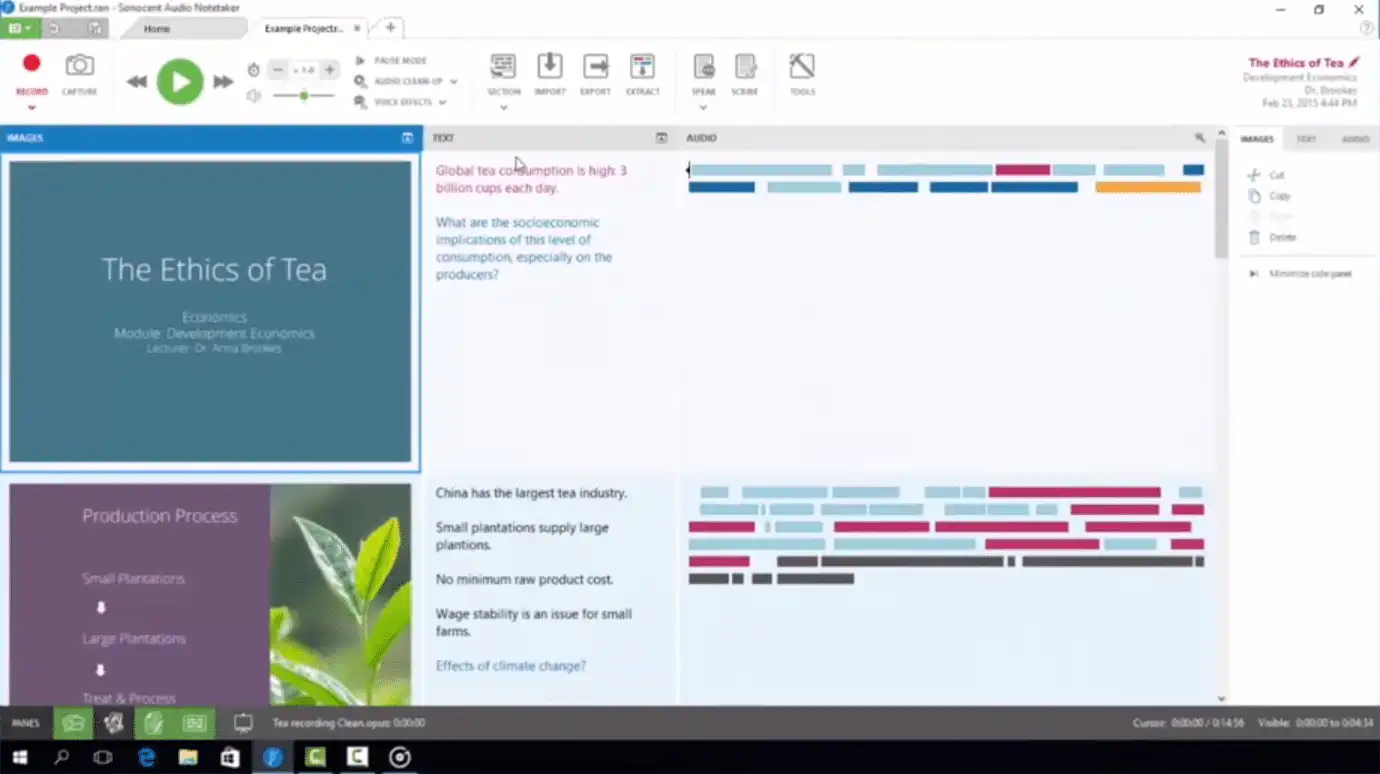
3. Sonocent Audio Notetaker (Best for Slide-Based Learning)
A highly visual desktop application built for individuals who prefer mapping out their study material on a laptop.
- How it works: You can import PowerPoint slides or PDF documents into the program before a session begins. As you record, the software visualizes blocks of audio right next to the corresponding slide.
- Dyslexia Benefit: You can color-code your audio blocks (for example, red for “difficult concept” or green for “exam topic”) without needing to type a single word during the live event.
4. Microsoft OneNote (Best Built-In Tool)
A highly accessible choice if your school or workplace already uses the Microsoft Office ecosystem.
- How it works: The “Transcribe” feature allows you to record live audio straight into your digital notebook while building a text transcript in a side panel.
- Dyslexia Benefit: OneNote integrates perfectly with Immersive Reader. You can have your generated notes read aloud to you with custom line spacing, larger fonts, and syllables highlighted to make reading easier.
Where to Use Assistive Recording Technology
This versatile technology adapts fluidly across multiple environments:
- Higher Education: In fast-moving seminars and dense academic lectures, it frees your mind from copying slides so you can focus on complex topics.
- The Corporate Workplace: Use it in project kick-off meetings, briefings, or annual general meetings (AGMs) to make sure you capture your specific deliverables without writing fatigue.
- Professional Development: Use recording software during corporate training days to build a searchable, personalized reference library that you can review at your own pace.
Suspect You Have Dyslexia? Your Essential First Step
While using smart recording apps can quickly take the stress out of your day, it is only part of a long-term strategy. Many adults and students go through life struggling with literacy tasks without realizing that their brains simply process language differently.
If you frequently experience fatigue when reading, struggle to copy down instructions, or find it hard to keep pace in meetings, you may want to explore your learning profile. Uncovering a dyslexic profile is a powerful step that can unlock tailored workplace adjustments, university grants, and specialist support.
The very first step is to book a professional dyslexia screening test. A screening is not a stressful exam; it is a gentle, one-to-one exploration of how your brain processes phonetics, holds short-term information (working memory), and interprets visual or auditory data (processing speed).
Taking control of your learning style is a profound act of self-advocacy. Whether you are looking to secure funding for premium software like Glean or simply want to understand your personal cognitive strengths, a screening provides the clarity you need.